
Website Tips
Launching a new website? Learn the most commonly overlooked launch-day tasks, from testing forms to setting up Google Search Console and basic SEO.

Launching a new website is exciting. After spending hours choosing images, writing content, tweaking layouts, and making sure everything looks just right, it's so tempting to just hit publish and call it a day.
But before you send your shiny new website out into the world, there are a few important things you'll want to double-check. These little details can make the difference between a website that simply exists and one that actually helps your business grow.
Whether you're launching a portfolio, a service-based business website, or an online shop, this website launch checklist will help you avoid common mistakes and create a better experience for both your visitors and search engines.
1. Test Every Link and Button
Nothing says "oops, I launched too soon" quite like a broken link.
Before your website goes live, click through every navigation item, button, and text link on your site. Make sure everything leads where it's supposed to and that visitors aren't running into error pages.
Broken links can be frustrating for potential clients, and they don't exactly create the best first impression. They can also make it harder for search engines to crawl your website properly.
Quick Tip:
Grab a cup of coffee and do a full click-through of your site. It might feel a little tedious, but future-you will be glad you did.
2. Make Sure Your Contact Form Actually Works
This one sounds obvious, but you'd be surprised how often it gets missed.
Imagine spending time and money promoting your website, only to realize weeks later that your contact form hasn't been sending inquiries anywhere.
Before launch, submit a test inquiry and make sure:
The message arrives in your inbox
Confirmation emails are working
Any automations are running correctly
If your contact form isn't working, you could be missing out on potential clients without even knowing it.
3. Set Up Google Analytics
Google Analytics helps you understand what's actually happening on your website.
Without it, you're basically flying blind.
Analytics can help you answer questions like:
How many people are visiting your website?
Which pages are getting the most attention?
Where are visitors finding you?
Which blog posts are bringing in traffic?
Even if you're not planning to dive into the data right away, it's a good idea to install Google Analytics before launch so you can start collecting information from day one.
4. Submit Your Website to Google Search Console
One of the biggest website launch myths is that Google will instantly find your website on its own.
Eventually, it probably will. But submitting your sitemap through Google Search Console helps speed things up and makes it easier for search engines to understand your site.
Think of your sitemap as a roadmap for your website.
By submitting it, you're helping Google understand:
What pages exist
How your content is organized
What should appear in search results
If getting found online matters to your business, don't skip this step.
5. Add Page Titles and Meta Descriptions
If you're looking for an easy SEO win, this is it.
Your page title is the headline people see in Google search results, and your meta description is the short summary underneath it.
For example:
Page Title:
Wedding Photographer in Grand Rapids, Michigan | Jane Smith Photography
Meta Description:
Natural, timeless wedding photography for couples throughout West Michigan and beyond.
Taking a few minutes to write clear page titles and meta descriptions helps search engines understand your content and gives people a reason to click on your website instead of someone else's.
6. Check Your Mobile Experience
Here's the reality: most people are probably visiting your website from their phone.
A website that looks amazing on desktop but feels clunky on mobile can send visitors clicking away pretty quickly.
Before launch, review every page on:
Desktop
Tablet
Mobile
Pay extra attention to:
Text size
Image cropping
Spacing
Navigation menus
Contact forms
If something feels awkward or difficult to use on mobile, now's the time to fix it.
7. Create a Helpful 404 Page
Let's be honest, most visitors will never see your 404 page.
But if they do, it's a great opportunity to help them stay on your website instead of leaving altogether.
Rather than showing a boring error message, create a custom 404 page that includes:
A friendly message
A link back to your homepage
Links to popular pages
Contact information if it makes sense
It's one of those small details that makes your website feel polished, thoughtful, and professional.
Launch With Confidence
The truth is, launching a website isn't usually derailed by one major mistake.
It's the small things.
A forgotten contact form. A missing page title. A broken link. An analytics account that never got connected.
Individually, they don't seem like a big deal. But together, they can impact your visitors' experience and make it harder for your website to do the job it was built to do.
That's exactly why I created a simple pre-launch resource to help you catch those details before they become problems.
Before You Hit Publish: The Stress-Free Website Launch Checklist + Beginner SEO Guide
This free guide walks you through the final steps of launching your website, including:
Design and functionality checks
Technical setup essentials
Launch day tasks
Beginner SEO best practices
The small details that are easy to overlook
So before you hit publish, take a few minutes to make sure everything is in place.
Download the free Website Launch Checklist + Beginner SEO Guide →
About the Author

Hi, I'm Stacey, the face behind FoxAura. I help creative business owners build thoughtful, strategic websites that attract the right clients and grow with their business.
Explore Templates
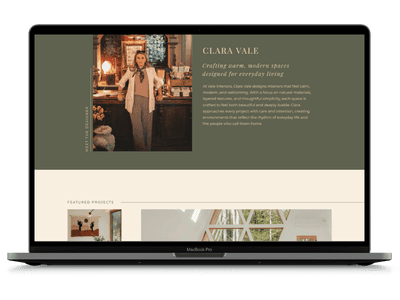
Looking for a website that's already designed with strategy in mind? Browse the collection of professionally designed website templates.

Stay Inspired
Get tips & resources straight to your inbox
Join the list and get helpful resources, launches, and website tips you can actually use.